
Post templates
Neutrino ships two families of post layout, and you choose per post. They differ in one thing: where the feature image goes.
A cover hero puts the image behind the title, filling the screen, and the reader scrolls into the article from a cinematic opening. It's the layout Neutrino is known for, and it suits anything where the image is doing narrative work.
A compact hero puts the image below the title instead, as a tidy block in the flow of the page. Nothing is overlaid, nothing moves on scroll, and a contents list can sit above the body where it's actually usable. It suits anything a reader is consulting rather than reading through — documentation, FAQs, policies, reference pages.
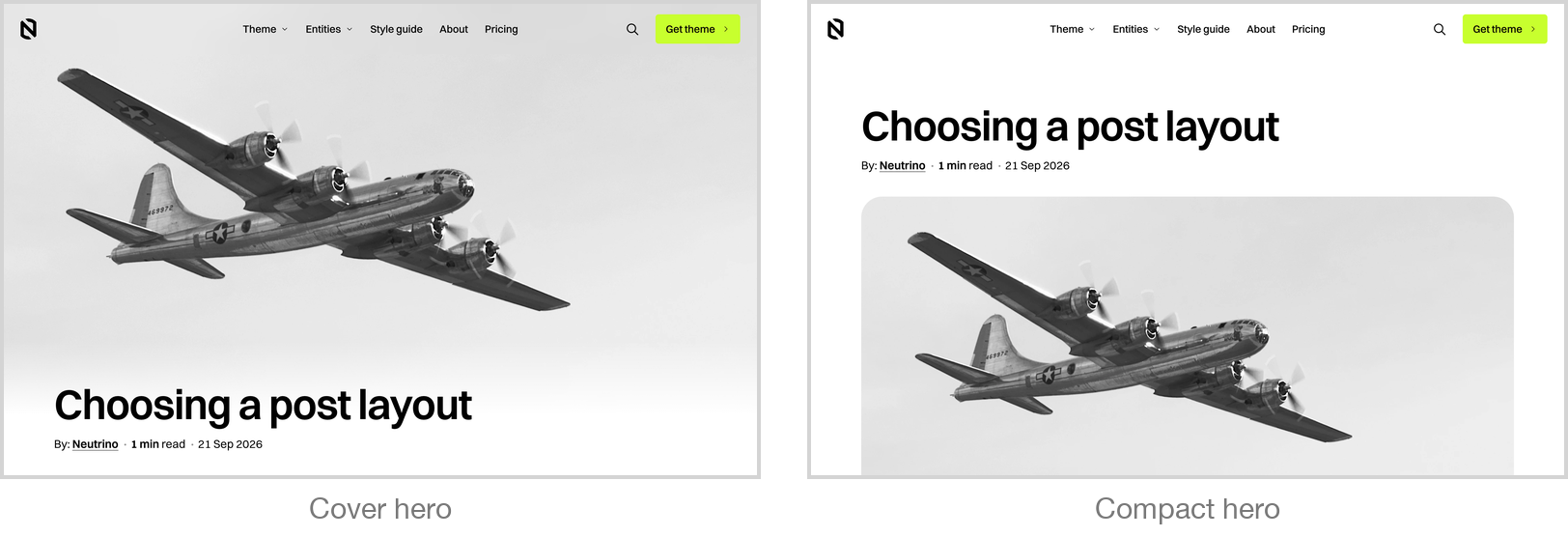
That's the whole distinction, and it's why the families are named after the image rather than after a kind of content: a compact hero started life as a layout for support articles, and turned out to be just as right for a pricing explainer or a terms page.
There are three table-of-contents behaviours: none, top-level headings only, or every level nested — the deepest of the three being a compact-hero option only. The contents list is built from the headings you write, so a well-structured post gets a usable one with no extra work. And because Ghost offers the same list on pages, a standalone reference page can take either layout too.